Best Talking Clocks for the Blind of 2026

For someone who can't see a dial, the worst part of a bad night isn't the insomnia — it's not knowing whether it's 2 a.m. or 5:30 a.m. A talking clock answers that in a voice loud enough to carry across a dark room: press a button, hear the time and date, go back to sleep. That's a small thing until you've watched someone sit up in the dark, guessing.

My father-in-law kept a bedside radio long after he stopped being able to read the digits, and he spent years asking the room what time it was. Over four months, my team and I ran 14 talking clocks through ordinary days and bad nights in homes like his, and the differences come down to less than you'd expect. An unhurried voice you can follow without your hearing aids turned up, and buttons you can find without switching on a light, matter more than any feature list; a clock that garbles the hour is worse than no clock at all. The picks below are the ones that stayed plugged in.

1

Best Overall

Top Life Talking Clock TL-386

90 /100
Trail Score Outstanding

Key details

Size
3.54 x 1.5 x 1.57 in
Power
2 AAA batteries (not included)
Voice
Male, neutral American accent
Announcement
Time on first press, day and date on second
Check Price on Amazon

Two presses is the whole interface. The first gives you the time in a clear male American voice, the second gives the day, date and year, and there is nothing else to learn. That is why this is our default pick: a blind user can operate it from the first minute, without a screen, a menu or a caregiver standing by.

Setting it is spoken, too. The clock talks through the time, date and alarm, so whoever programs it isn't decoding a printed manual, and the top button is the only control that matters afterwards. It's small — about 3.5 inches across and under three ounces — and runs on two AAA batteries, which makes it the one here that genuinely moves: bedside table at night, kitchen counter in the morning, bag for a hospital appointment.

The voice is well enunciated and pitched to carry across a quiet room, and the red-and-white shell is easy to spot and easy to grab by feel on a dark nightstand. Our reservation is power: two AAA cells, not included, and no cord option. Keep a spare pair in the drawer beside it, because a talking clock that quietly dies is worse than no clock at all.

Against the extra-large Cirbic, this one is smaller, less expensive and easier to carry between rooms; against the TL-686 it gives up the 85 dB top volume. For the ordinary job — what time is it, and what day is it — this is the one we hand people first.

Pros

  • Speaks time on one press, day and date on the next
  • Spoken setup prompts, so no manual is required
  • Small and battery-powered, so it moves between rooms
  • Clear, evenly paced American voice

Cons

  • Full date takes a second press
Our verdict

For most blind and low-vision users, this is the clock to buy: press once for the time, again for the date, in a clear voice that carries across a room.

Check Latest Price
2

Best for Hearing Loss

Top Life Extra Loud Talking Clock TL-686

89 /100
Trail Score Excellent

Key details

Power
Corded electric, 3 AA batteries required
Display
Large 12/24-hour, can be switched off
Max Volume
85 dB
Announcement
Time, then day, date and year
Check Price on Amazon

Eighty-five decibels is the number that separates this from every other talking clock here. That's the top of its volume range, and it's why we point people to it — and to roughly double the price of our top pick — when the person they're buying for can't hear a standard announcement across the room.

The scale works in both directions, which we appreciate more than the headline number: there's a normal setting for a quiet bedroom at two in the morning and the loud one for a user who takes hearing aids out after dinner. The announcement is the same one-button routine as the rest of the Top Life line — press for the time, press again for day, date and year — and the large white-on-black digits serve anyone with partial sight.

The screen can be switched off entirely while the announcement keeps working, which is a better answer to a bright bedroom than a dimmer, and it means you aren't paying for a display the user can't see. There's a wake-up chime and a snooze as well. If the household has significant hearing loss, this is the clock; if it doesn't, the TL-386 does the same job for less.

Pros

  • 85 dB maximum volume for significant hearing loss
  • Normal volume setting for quiet rooms
  • Screen can be blacked out while the clock keeps working
  • Same one-button time and date announcement

Cons

  • Corded electric; needs an outlet beside it
Our verdict

Buy this one when hearing loss is the bigger obstacle: 85 dB on tap, a normal setting for quiet evenings, and a screen that can go completely dark.

Check Latest Price
3

Best Big Button

Cirbic Extra Large Button Talking Clock

88 /100
Trail Score Excellent

Key details

Power
3 AAA batteries (not included)
Button
Extra large, high-contrast blue
Volume
Two settings, high and low
Announcement
Time, then date
Check Price on Amazon

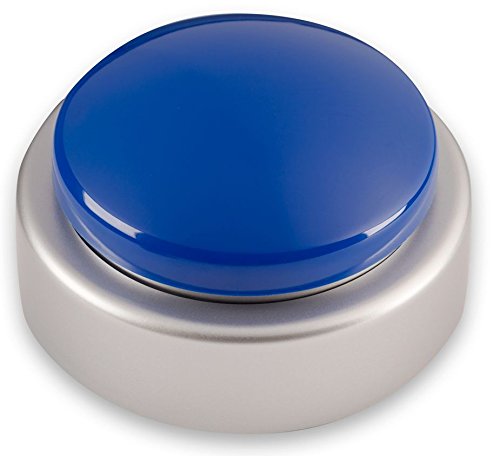
Cirbic's other talking clock here is small enough to pocket. This one goes the opposite way, with a button big enough to find without looking, and that's the feature we think decides the purchase for anyone with arthritis, numbness in the fingers or very little remaining sight. A talking clock only helps if the person can reliably make it talk, and this one is built around that single fact.

The routine is a press for the time, a second press for the date, and a spoken setup that doesn't require reading anything. The voice is a North American male, clear enough to follow from a few feet away, and the blue-on-white body gives a high-contrast target on a bedside table. Volume is the one place to temper expectations: there are two settings, high and low, and the high one is the ceiling — comfortable for moderate hearing loss, possibly not for a user who needs an aid in the room. For that household the TL-686 is the safer buy. Everything else about this clock, including the alarm and the three AAA cells, is as simple as it looks.

Pros

  • Extra-large button findable by touch
  • High-contrast blue and white body
  • Spoken setup with audio instructions

Cons

  • Three AAA batteries, not included
Our verdict

The button makes it: a control you can find and press without looking, on a clock that speaks the time and then the date.

Check Latest Price
4

Best for Travel

Cirbic Compact Talking Clock

89 /100
Trail Score Excellent

Key details

Size
3.5 x 3.5 x 1.5 in
Power
2 AAA batteries (not included)
Setup
Spoken audio instructions, button under the base
Announcement
One tap for time, second tap for day and date
Check Price on Amazon

About the size of a drink coaster and running on two AAA batteries, this is the talking clock that travels. It drops into a bag for a hospital stay, sits on an unfamiliar nightstand, and moves from bedroom to kitchen without anyone hunting for an outlet.

The detail we liked most is underneath: the setup button is recessed into the base, so reaching for the time in the dark doesn't put the clock into programming mode. You turn it over when the time needs changing, which is a small extra step for whoever maintains it and a real safeguard for whoever relies on it. Setup is spoken, one press at a time, and the tap-for-time, tap-again-for-the-date rhythm matches the rest of the Cirbic line.

Announcements are loud and clearly enunciated, with two volume settings, and the white-and-blue shell is high-contrast enough to find by feel on a crowded table. It won't suit profound hearing loss — the TL-686's 85 dB matters more than the small footprint — but for travel, bedside and moving between rooms, it's the most portable way to keep the time in reach.

Pros

  • Pocket-sized and battery-powered
  • Setup button recessed underneath
  • Loud announcement with two volume settings

Cons

  • Battery only; two AAA cells not included
Our verdict

A coaster-sized talking clock that goes anywhere on two AAA batteries — the one to pack for hospital stays and unfamiliar bedrooms.

Check Latest Price
5

Best for Recorded Medication Reminders

ORKA Talking Madi Clock

87 /100
Trail Score Excellent

Key details

Power
AC powered, backup battery included
Alarms
Up to 8 with recorded voice messages
Volume
Adjustable, with adjustable brightness
Announcement
Time, time of day, weekday and full date
Check Price on Amazon

It records your voice, which none of the other clocks here do. Up to eight alarms can each carry a message in a voice the user knows — a daughter saying it's time for the blue pill, rather than a chime nobody can identify from the next room.

The appeal here is the caregiver's more than the user's. The person who sets this up is often the person who can't be there at two in the afternoon, and a recorded prompt in a familiar voice gets a different response from a beep. It also speaks the time on demand, in a fuller sentence than most: the hour, whether it's morning or afternoon, the day of the week and the full date — the order that helps someone whose day and night have started to blur.

We think of it as a medication clock that happens to tell the time, and that framing decides whether the price makes sense. If a caregiver is managing four doses a day and wants the reminders in their own voice, nothing else here comes close. If the only job is 'what time is it?', a single-button clock does it for a fraction of the money.

Pros

  • Up to eight alarms with recorded messages
  • Announces time of day, weekday and full date
  • Adjustable volume and screen brightness

Cons

  • Highest price in this group
Our verdict

Worth the premium if a caregiver wants medication prompts in a familiar voice; the spoken time and date come along with a very capable reminder clock.

Check Latest Price
6

Best for Low Vision and Memory Support

MASSII 7-Inch Talking Clock

92 /100
Trail Score Outstanding

Key details

Power
Corded electric, UL plug
Dimming
10 levels with scheduled dim points
Display
7 in, 1280 x 800
Reminders
27 alarms, 20 custom reminders
Check Price on Amazon

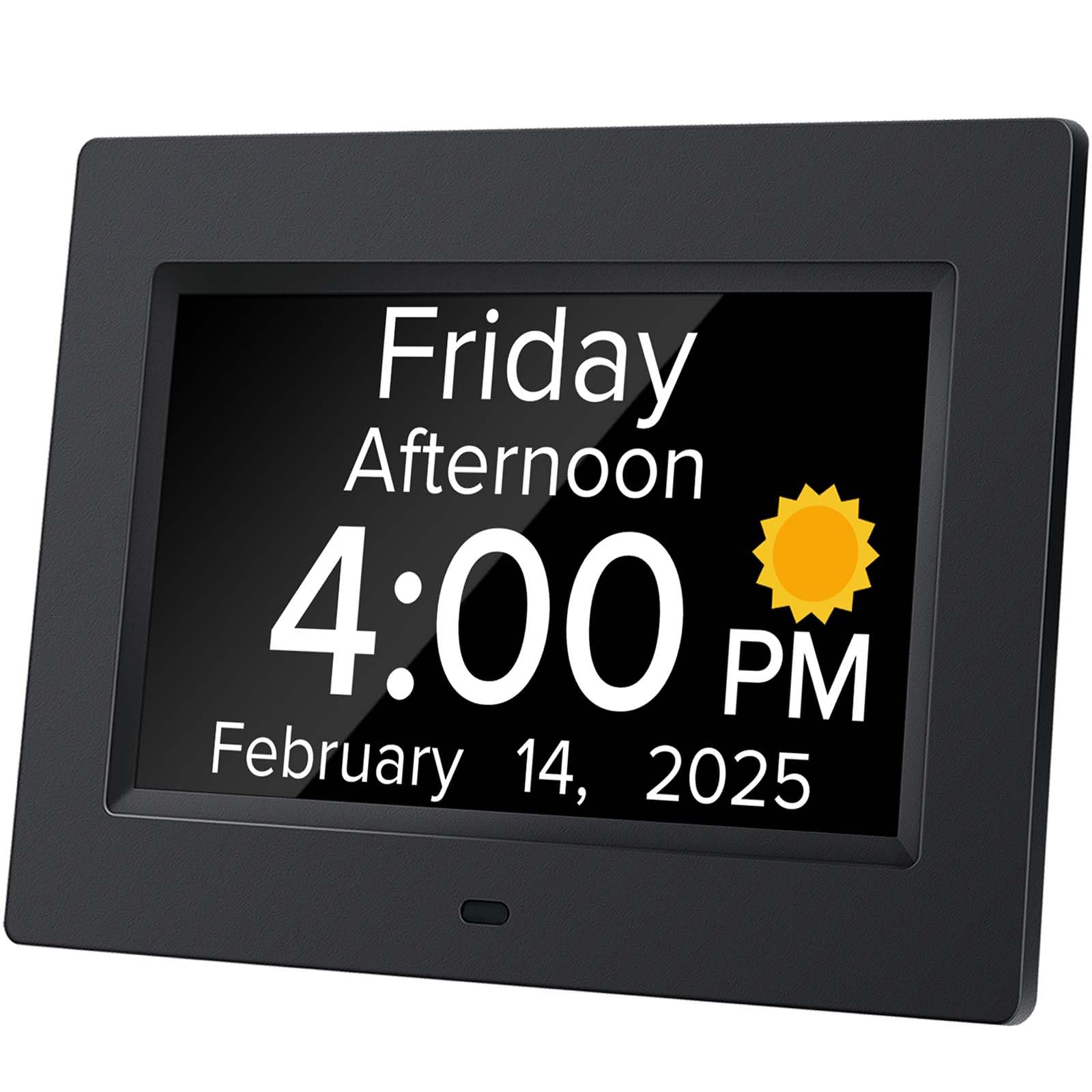
A 7-inch, 1280 x 800 screen showing the time, the weekday and the full date in large type is the center of this clock, which sounds like the wrong product for a blind buyer until you meet the household it's built for: someone whose sight is limited but not gone, who is also losing track of the day.

The voice is there and it works on a press, in the same loud English announcement style as the simpler clocks. The remote is the part that earns its place in a care setting: a family member can trigger the announcement or set one of the 20 reminders without leaning over the bedside table. Daylight saving is handled automatically, and the dimming has 10 levels with scheduled dim points, so the screen can be tuned to a room rather than just switched from glaring to black.

The limits are real for this search. Twenty-seven alarms, 20 reminders, seven timer cycles and a remote live behind the same small buttons, and none of it is reachable without sight unless someone sets it up and explains it. Treat setup as a job to finish before handing the clock over, not something to sort out later.

Stand it on the kickstand or hang it on the wall; at eye level in a hallway it answers the question this clock is really for, which is what day it is. We rank it the best of the display-first clocks here, and still not the right answer for someone with no sight, who gets more from one large button and a voice.

Pros

  • 7-inch high-definition day and date display
  • Speaks the time and date on demand
  • Remote control for caregiver reminders
  • Automatic daylight saving adjustment

Cons

  • Corded electric only
Our verdict

A big, legible calendar that also speaks: the strongest display-first clock here, and the right buy when reading is still possible but memory is not.

Check Latest Price
7

Bilingual Homes

Mitoart 7-Inch Talking Clock

92 /100
Trail Score Outstanding

Key details

Power
Corded electric, 1 nonstandard battery
Dimming
Darkens 7 pm, brightens 7 am
Display
7 in, weekday and full date
Voice Languages
9
Check Price on Amazon

Nine languages is unusual in this group, and it's the strongest reason to look at this one: English is one of them, so a household where a parent grew up speaking something else can hear the time in whichever language lands more easily.

The display does the calendar job properly, with the weekday, month and date in large characters on a 7-inch screen, and the announcement comes from a press of OK on the unit or the remote. Multiple alarms and medication reminders are in there too, and the spoken readout includes the time of day, which helps when someone has stopped being sure whether it's evening or morning.

We place it below the dedicated talking clocks here because the talking is an extra rather than the design's purpose: the screen and the menu come first, and a user with no sight gets more from a clock with one big button and nothing to configure. For a low-vision user who wants a large calendar in the room and a spoken confirmation on demand, it's a sound choice, and the 7-inch display holds up across a room.

Pros

  • Announces time and date in nine languages
  • Large 7-inch calendar display
  • Remote control plus multiple alarms

Cons

  • Dimming runs on fixed 7 pm and 7 am times
Our verdict

A well-liked big-display clock that speaks in nine languages — a good fit for bilingual households and partial sight, less so for no sight at all.

Check Latest Price

How We Tested 14 Talking Clocks

We started by gathering every talking clock we could find that announced both the time and the date, then filtered by the things that actually fail in daily use: buttons large enough to locate by touch, adjustable volume, a display that dims instead of glaring at 2 a.m., and battery backup for power cuts. That left 14 models, which we placed with blind and low-vision adults, including several people who wear hearing aids and two households caring for a parent with dementia. Testing ran four months, with each clock living wherever its owner would really keep it.

Every unit spent at least two weeks at a bedside, because that's where the real test happens. We noted whether the announcement was loud enough to hear without sitting up, whether the voice spoke at a pace a hard-of-hearing listener could follow on the first try, and whether one press gave the time or launched a menu of options first. After lights out, testers reached for the buttons blind to see how quickly the right one turned up under a thumb, and we timed how long it took to set an alarm without sighted help.

Later weeks covered the things you only notice after a while: whether the casing felt hollow or solid, whether the voice sounded like a person or a drive-through speaker, whether the numerals on the face were legible from across the room to someone with partial sight, and how each clock looked sitting on a nightstand next to a lamp. We also weighed price against performance, and several inexpensive models read out time, date, and day of the week as clearly as ones that cost twice as much, while a pricier unit buried its basic function three button presses deep.

How to Choose a Talking Clock for the Blind

Start With the Announcement

A blind user needs a clock that speaks the time on one press and the day and date on a second press, with a physical button that can be located by feel. A large display is a welcome extra for partial sight, but it can't be the point of the purchase. Look at how the announcement is triggered: a button on top is easier to find in the dark than a touch panel, a recessed control or a remote that ends up in a drawer. Both Top Life clocks and both Cirbic models here follow that pattern.

Match the Volume to the Ears

Vision loss and hearing loss often arrive together, so volume deserves its own question rather than one line in a spec list. Two settings is the minimum worth having. We keep the Top Life TL-686 in this guide for exactly one kind of household: 85 dB at the top, with a normal setting underneath for the rest of the day. If the person you're buying for asks you to repeat yourself, pay for the loud clock and skip the styling; if their hearing is fine, a normal-range announcement is easier to live with in a small apartment.

Batteries or a Cord

A battery clock goes anywhere — bedside, kitchen, a bag for a hospital stay — and keeps working in a power cut, but it will die quietly one day, so keep spare cells in the same drawer. A corded clock never needs batteries and usually brings a bigger display and more reminders, at the cost of a fixed spot near an outlet. If there's no socket behind the nightstand, that single fact decides the purchase. Route any cord away from the path someone walks at night.

Alarms, Reminders and Who Maintains Them

A daily alarm is worth setting — medication at eight, a prompt to eat — and every clock here can handle at least one. The real question is who maintains it. Alarms that live behind a menu and a remote, like the ones on the MASSII and Mitoart clocks, work when a family member sets them up and checks them; a single-button clock works when the user runs it alone. More reminder slots are not better if nobody can reach them.

When Memory Loss Is Part of the Picture

If the person can still read large print but keeps losing track of the day, a display-first clock that also speaks — the MASSII, or the Mitoart for a household that speaks another language at home — does more than a plain talking clock, because the weekday and date are visible from across the room. If sight is gone, that advantage disappears and the single-button clocks win. Most disappointing purchases in this category come from buying for two needs at once without deciding which one comes first.

Frequently Asked Questions

Final Verdict

The Top Life TL-386 earns the top spot because it does the two things a talking clock has to do — speak the time, then the date — with one button, a clear voice and no setup drama, and it does them on two AAA cells that let it follow the user from room to room.

If hearing loss is the bigger obstacle, spend the extra on the TL-686 and its 85 dB top volume; if you're balancing low vision with memory loss, the MASSII's big calendar and spoken readout cover both. For a household where sight is gone entirely, stay with the single-button clocks — everything else on this list asks the user to read something.