Best Laptop Stands for Neck Pain of 2026

By 3 p.m. most days, the ache settles in at the base of my neck — a dull, hot knot that shifting in my chair never fixes. It took me an embarrassingly long time to admit the culprit was the laptop sitting six inches too low. A stand's only real job is to lift the top of the screen to eye level and hold it there while you type. Get that right and the hunching stops; get it wrong and you've bought yourself a wobbling slab of aluminum.

Height alone isn't enough — a stand that shivers when you type, or whose hinge sags when you nudge it, puts you right back into a slouch. Our team has lived with 14 of them over the past four months, at a desk, on a kitchen counter, and on the couch, and the joints are where cheap ones out themselves. One thing to know first: a stand only helps if you lift your keyboard and mouse too. The ones that held their position are below; the rest are in a box.

1

Best Overall

Nulaxy C1

95 /100
Trail Score Outstanding

Key details

Support
Dual support rods
Adjustment
Height and angle
Laptop Fit
10–16 in
Folding Design
Folds flat
Check Price on Amazon

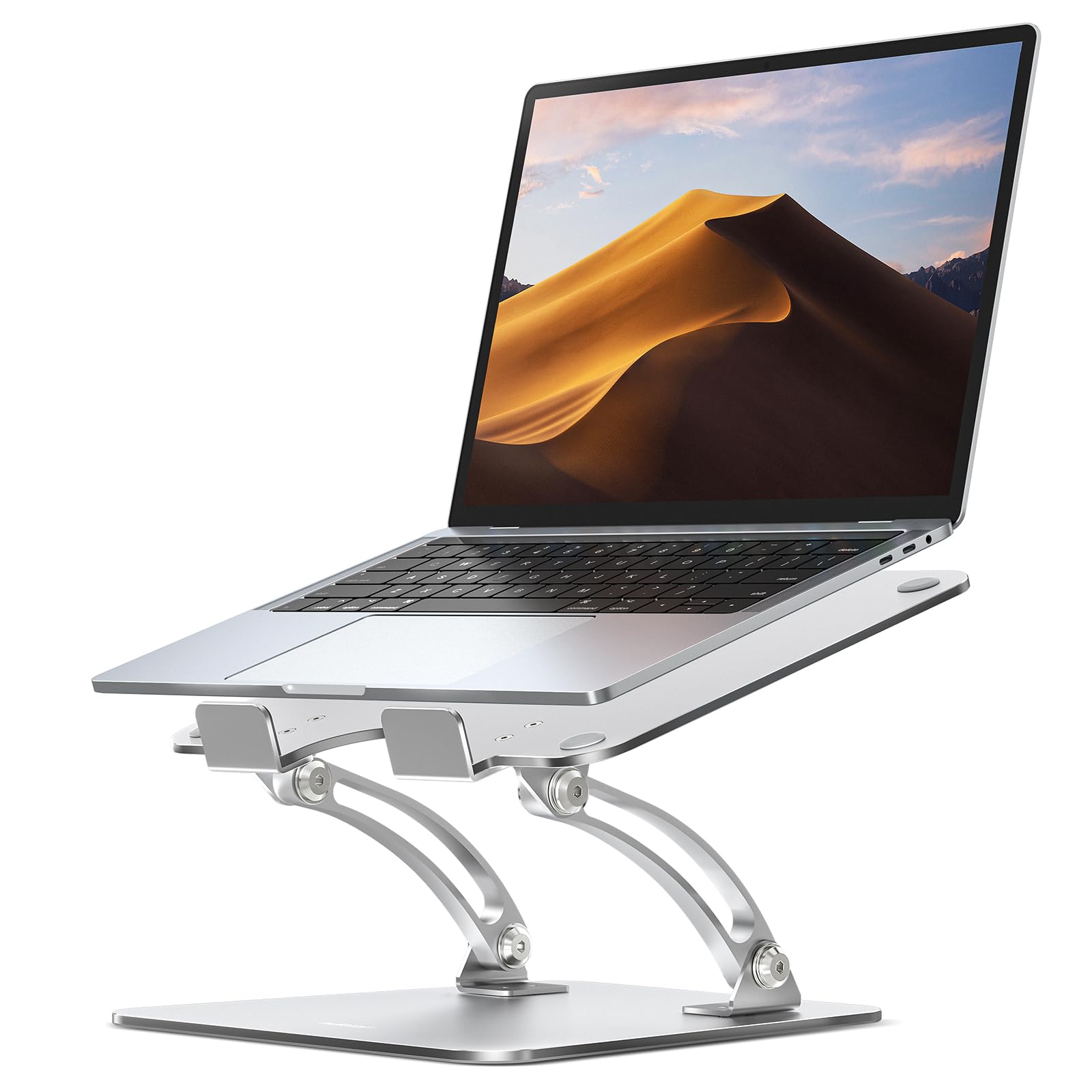
The Nulaxy C1 is the stand we recommend first because it solves the neck problem without asking you to rebuild your desk. The platform adjusts in height and angle, so a 10- to 16-inch laptop can sit close to eye level, and the dual support rods keep the whole thing from feeling like a music stand. We used it as a screen raiser with a separate keyboard, which is the setup that actually lets your shoulders drop.

What we appreciate most is how little attention the stand asks for. The open panel leaves room for airflow, the silicone pads hold the laptop without scratching it, and the frame folds flat enough to slip behind a monitor or into a bag. The firm hinge is part of why it feels steady; it does not drift down when you lean on the desk. We did not find ourselves re-tightening anything during the day.

The folding design is the other reason it earns its place. When the workday ends, the stand collapses into a flat package that takes up little shelf space, and the open frame is easy to wipe down. It is not the stand for someone who wants a motorized lift or a swivel base, but for a fixed desk and a laptop that stays put, it covers the basics unusually well.

Pros

  • Dual-rod frame stays planted
  • Height and angle adjust to eye level
  • Fits 10- to 16-inch laptops
  • Folds flat for storage

Cons

  • Height changes need two hands and a clear platform
Our verdict

We recommend the Nulaxy C1 as the default stand for neck pain: it lifts most laptops to eye level, feels steady in daily use, and folds away when you need the desk back.
Check Latest Price
2

Best Extra-Tall

Lifelong UPRYZE

96 /100
Trail Score Outstanding

Key details

Adjustment
Height and angle
Laptop Fit
10–17 in
Folding Design
Folds for transport
Maximum Height
20 in
Check Price on Amazon

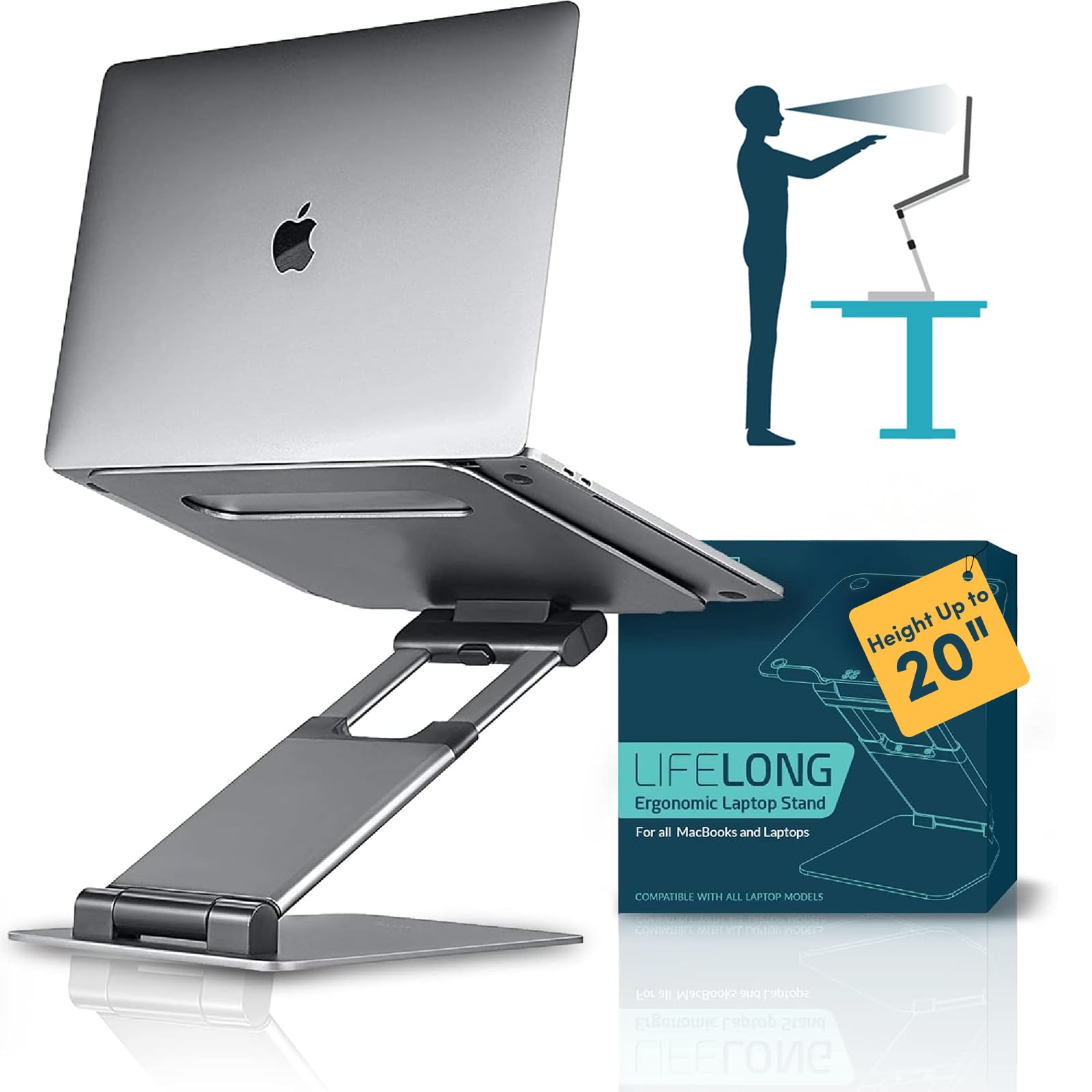
If your neck pain is worst when you stand, the Lifelong UPRYZE is the stand that makes the most sense. It is an extra-tall riser, with a top height around 20 inches, so a laptop can sit at standing eye level instead of forcing you to look down at a kitchen counter. The broad base is the reason it works: at that height, a skinny stand would feel like a sail in a breeze.

The UPRYZE is built like a small lectern. The aluminum frame has a solid, planted feel, the platform holds a 10- to 17-inch laptop, and the whole thing folds for transport. We liked that it does not look like a piece of medical equipment; it reads as a simple desk accessory, which matters if it is going to live in a shared room. The height and angle are adjustable, so you can tune the screen without stacking books underneath.

What we think sets it apart is the combination of reach and calm. A tall stand has to resist the leverage of a laptop hanging in the air, and this one feels composed rather than tippy. The price is premium, so it is a purchase for someone who has already decided a standing setup is worth it. For a dedicated standing desk, it is the one we reach for.

Pros

  • Reaches 20 inches for standing
  • Broad base resists wobble
  • Folds for transport
  • Solid aluminum build

Cons

  • Large base needs a roomy desk
Our verdict

For a laptop stand that doubles as a standing desk, the Lifelong UPRYZE is the one we reach for: it goes high, stays solid, and folds down when the day is over.

Check Latest Price
3

Best Sit-Stand

tounee LS07 EXPRO

94 /100
Trail Score Outstanding

Key details

Swivel
360°
Laptop Fit
10–17 in
Height Range
2.1–21 in
Load Capacity
22 lb
Check Price on Amazon

The tounee LS07 EXPRO is the stand to choose if you want to change from sitting to standing without buying a second desk. Its height range runs from 2.1 inches to 21 inches, which is the widest here, and the 360-degree base lets you swing the laptop toward a colleague or away from a glare source. The aluminum build carries a 22-pound rating, so a heavy 16- or 17-inch machine is not asking too much.

We were impressed by how much this stand does without feeling like a contraption. The large base keeps it steady at full extension, the platform folds down for storage, and the swivel has a smooth, controlled feel rather than a loose spin. It is the most expensive stand in this group, and it earns that mostly through range and movement, not through a nicer finish. If your neck pain comes from hours in one seated position, the ability to stand for part of the day is the real feature.

Pros

  • Widest height range here
  • 360-degree swivel base
  • Holds up to 22 pounds
  • Folds for storage

Cons

  • Height changes take some force
Our verdict

We recommend the tounee for anyone who wants a sit-stand setup: its height range is the widest here, the swivel base is genuinely useful, and it stays steady with a 22-pound load.

Check Latest Price
4

Best for Large Laptops

Lamicall Aluminum

95 /100
Trail Score Outstanding

Key details

Base
Large aluminum base
Adjustment
Height and angle
Laptop Fit
10–17.3 in
Folding Design
Folds flat
Check Price on Amazon

Large laptops need a broader platform, and the Lamicall is the stand we trust for a 16- or 17-inch machine. The top is rated for laptops up to 17.3 inches, and the base is wider and heavier than the budget folding stands here, which gives a big screen less leverage to tip. The aluminum finish looks more expensive than the price tier suggests.

The height and angle are adjustable, so you can bring the screen up to eye level and tilt it away from overhead light. We liked the open back for airflow and the silicone pads that keep a metal laptop from sliding. The stand folds flat, though it is not the thinnest folded option in this group; it is better for a desk that stays put than for a daily commute.

The Lamicall makes the most sense as a fixed desk stand. It does not swivel, and the folding hinge is there for storage rather than daily carrying. What it gives you instead is a broad, calm platform for a large screen, which is the part that matters when the goal is to stop hunching toward a laptop.

What we appreciate most is the fit. A 15-inch laptop sits comfortably inside the arms rather than perched on the edge, and a 17-inch model does not overhang in a way that feels precarious. If you need the widest laptop compatibility here, this is the one to choose; if you have a smaller machine and want to spend less, the Nulaxy C1 is easier to justify.

Pros

  • Fits laptops up to 17.3 inches
  • Large base steadies big screens
  • Height and angle adjust
  • Folds flat

Cons

  • Bounces when typing on the laptop keyboard
Our verdict

We point large-laptop owners to the Lamicall: it holds a 17.3-inch machine on a broad base, adjusts to eye level, and folds down without fuss.

Check Latest Price
5

Best Fixed-Height

BESIGN LS03

96 /100
Trail Score Outstanding

Key details

Assembly
Three-piece detachable
Elevation
6 in
Laptop Fit
10–15.6 in
Load Capacity
8.8 lb
Check Price on Amazon

The BESIGN LS03 is the stand for someone who wants a simple lift and does not care about dialing in the angle. It is a three-piece aluminum riser that goes together in seconds and holds a 10- to 15.6-inch laptop at a 6-inch elevation. We like that there is nothing to fiddle with: you set the laptop down, and the screen stays where the stand puts it. For a basic desk setup, that is often enough.

Assembly is the other pleasant surprise. The three pieces fit together without tools, and the detachable design breaks down flat for storage. The open aluminum frame leaves plenty of room for airflow, and the silicone pads grip both the laptop and the desk. It is not the stand for a laptop larger than 15.6 inches, but for a standard work machine it is a clean, stable solution.

Pros

  • Assembles in three pieces
  • Fixed 6-inch lift
  • Holds up to 8.8 pounds
  • Open aluminum frame

Cons

  • No height or angle adjustment
Our verdict

The BESIGN LS03 is our pick for a simple fixed riser: it lifts a 10- to 15.6-inch laptop about 6 inches, assembles quickly, and does not ask for adjustments.

Check Latest Price
6

Best Budget for Heavy Laptops

Gogoonike Metal

93 /100
Trail Score Outstanding

Key details

Adjustment
Height and angle
Laptop Fit
10–15.6 in
Load Capacity
17.6 lb
Folding Design
Folds for travel
Check Price on Amazon

If your laptop is on the heavy side, the Gogoonike is the budget stand we check first. The metal frame is rated to 17.6 pounds, which is more than most cheap folding stands here, and the platform has vent holes and silicone pads to keep a large machine from sliding. It is a plain black stand, but plain is fine when the job is to hold a work laptop steady.

The height and angle adjust through a hinged frame, and the whole thing folds for travel. We like that the load rating is not an afterthought: the arms and hooks feel sized for a 15.6-inch laptop rather than a tablet. The stand does not take up much desk space when folded, and the open front leaves ports accessible.

What we think matters most is the value. This is one of the least expensive ways to get a metal stand with a high load rating, and it does the basic job of raising a screen. It is not the most refined stand here, but it gives a heavy laptop a secure perch without asking for a premium price.

Pros

  • 17.6-pound load rating
  • Metal frame with vent holes
  • Height and angle adjust
  • Folds for travel

Cons

  • Can shift when you type on the laptop
Our verdict

We recommend the Gogoonike for heavier laptops on a tight budget: its 17.6-pound rating and metal frame give it a job the cheapest stands here cannot match.

Check Latest Price
7

Screen Sharing

JOYEKY Swivel

94 /100
Trail Score Outstanding

Key details

Swivel
360°
Laptop Fit
10–16 in
Folded Size
9.45 x 9.45 x 1.25 in
Maximum Height
11.81 in
Check Price on Amazon

The JOYEKY is the middle path between a compact riser and a full sit-stand stand. It raises a 10- to 16-inch laptop up to 11.81 inches, which is enough to bring a screen close to eye level for many seated users, and the 360-degree base swings the laptop around for sharing. The aluminum frame folds down to 9.45 by 9.45 by 1.25 inches, so it can live in a drawer or a bag.

We like the swivel more than we expected. It moves smoothly without feeling loose, and it makes a shared desk less awkward because you can turn the screen instead of turning the whole stand. The height and angle adjust through a firm hinge, and the folded package is genuinely compact. It is not a standing desk substitute; the top height is about knee-to-waist level for a tall user, not standing eye level. For seated work and screen sharing, it hits a useful middle.

The JOYEKY is not trying to be the most planted stand here. Its job is flexibility, and it does that without taking over the desk. If you mostly leave the laptop in one position, a simpler fixed stand will feel more solid; if you share a screen or move between angles, the swivel earns its keep.

Pros

  • Raises to 11.81 inches
  • 360-degree swivel
  • Folds to 1.25 inches thick
  • Fits 10- to 16-inch laptops

Cons

  • Wobbles when typing on the laptop
Our verdict

We like the JOYEKY for a desk where screens get shared: it swivels smoothly, rises to a useful seated height, and folds thin enough to stash.

Check Latest Price
8

Slim High Lift

Amazon Basics

92 /100
Trail Score Outstanding

Key details

Laptop Fit
10–15.6 in
Folded Size
10 x 8.7 x 1.8 in
Load Capacity
11 lb
Height Adjustment
Up to 7 in
Check Price on Amazon

The Amazon Basics stand is the one we choose when a standard riser does not go high enough but a full standing desk is overkill. It adjusts up to 7 inches, which is generous for a folding stand, and it fits laptops from 10 to 15.6 inches. The aluminum frame has a slim, open look that does not crowd a small desk.

The folding design is the practical part. It collapses to 10 by 8.7 by 1.8 inches and weighs little enough to drop into a laptop bag, and the open front keeps ports and vents clear. We liked that the stand comes ready to use; there is no assembly step beyond unfolding it. The 11-pound rating is fine for most ultrabooks and standard work laptops.

The stand holds its position well once you set it. We treat it as a set-once stand rather than something to fidget with during the day. The non-slip pads do their job on a wood desk, and the platform stays where you leave it.

What we think makes it worth considering is the height-to-footprint ratio. Seven inches of lift in a package this slim is useful for taller users or for lining a laptop up with an external monitor. It is a compact alternative to a full monitor arm, and it leaves the desk underneath free for a keyboard. For a small desk that needs more height, it is a smart pick.

Pros

  • Up to 7 inches of height
  • Folds to 1.8 inches thick
  • Holds up to 11 pounds
  • Fits 10- to 15.6-inch laptops

Cons

  • Bounces if you type on the laptop
  • Stiff to raise and lower
Our verdict

The Amazon Basics stand is a good choice when you need more height without a big base: it adjusts up to 7 inches and folds slim for storage.

Check Latest Price

How We Chose and Tested the Best Laptop Stands

We started with roughly 40 stands pulled from retailer best-seller pages, brand lineups, and the models that keep resurfacing in ergonomics forums, then cut the list down by reading spec sheets: maximum height, footprint, weight capacity, and whether the thing folds flat enough to travel. Price mattered less than whether the money went into the hinge and the base rather than the packaging, so we shortlisted 14 models across a wide spread of prices and landed each one on a real desk for four months.

Every stand moved between a home office desk, a kitchen counter I sometimes work at standing, and the couch, and I typed full workdays on all of them rather than tapping for five minutes. At each spot I measured where the top of the screen landed relative to my eye line and noted whether a single position genuinely worked for both sitting and standing. For stability, I pressed the front edge with a flat palm and typed deliberately heavy paragraphs; stands that skated, bounced, or dipped lost ground fast.

Stiffness turned out to be the deciding factor, in both directions. I adjusted every hinge one-handed, first thing in the morning, and logged whether it moved smoothly or fought me, then left a laptop on it overnight to see if the joint had crept by morning. Adjustability got the same treatment — how many useful heights a stand really offers, not how many the box claims. Quality and appearance we judged by living with them: seams, finish, and whether the thing looked like office equipment or something you'd leave out on a dining table. Value came down to whether the cheapest stands did the same job as the expensive ones.

Several of these are still in daily use on our desks, and we'll update as hinges loosen and finishes wear.

How to Choose a Laptop Stand for Neck Pain

Start With Eye-Level Height, Not the Spec Sheet

Neck strain usually comes from looking down, so the useful measurement is from your desk to your eyes, not the stand's height in the listing. Sit in your usual chair, look straight ahead, and note where your eye line hits the wall. The top of the laptop screen should land close to that line. A fixed riser like the BESIGN LS03 can work if its 6-inch lift matches you; otherwise an adjustable stand such as the Nulaxy C1 gives you room to tune. Measure before you buy, because a stand that is too low leaves you hunched and one that is too high makes you tilt your chin up.

Stability Is the Feature You Feel Every Day

At eye level, a laptop has more leverage, so a narrow base or a loose hinge turns every keystroke into a wobble. Look for a wide footprint, firm hinges, and rubber pads on both the platform and the feet. The Nulaxy C1 uses dual support rods to keep its platform from flexing, while the Lamicall's larger base is built for a heavier screen. If you type on the laptop's own keyboard, stability matters more than a few extra degrees of tilt; if you use a separate keyboard, you can accept a little more movement. A stand that shifts under your hands will not fix your posture, because you will keep bracing against it.

Match the Platform to Your Laptop

Check the laptop size and weight before the features. Most stands here fit 10- to 16-inch machines, but a 17-inch laptop needs a wider platform and a higher load rating; the Lamicall is rated to 17.3 inches, and the Gogoonike is rated to 17.6 pounds for heavier 15.6-inch models. A stand that is too narrow lets the laptop overhang, which makes the whole setup feel precarious. The load rating is not a guarantee, but it is a useful line to compare. If your laptop is at the top of a stand's range, look for a broader base.

Decide Whether You Need Swivel or Portability

A swivel base is useful when you share a screen or turn the laptop toward a colleague, and it is the main reason to choose the tounee or JOYEKY. If the stand stays in one spot, put the money into height and stability instead. Portability is a separate question: the Nulaxy C1 and Amazon Basics fold flat enough for a drawer or bag, while the Lifelong UPRYZE is better for a standing desk that stays put. Folded thickness matters more than folded length if you are sliding it into a laptop sleeve. Choose the movement you will actually use, not the longest feature list.

Plan for the Keyboard, Not Just the Screen

Raising the screen without moving the keyboard just shifts the problem to your shoulders. When the laptop is at eye level, its keyboard is too high for comfortable typing, so use a separate keyboard and mouse at roughly elbow height. That is the setup we used for most of these stands, and it is the difference between a screen riser and a full ergonomic fix. If you refuse to add a keyboard, choose a lower stand and accept that you will still look down a little. A stand is one part of the desk, not the whole cure.

Frequently Asked Questions

Final Verdict

Our default is the Nulaxy C1. It brings a 10- to 16-inch laptop up to eye level, stays planted on its dual-rod frame, and folds away when the desk is not in use. For most people with neck pain, that combination is the practical fix, and it costs less than the premium stands here.

If you want to stand for part of the day, choose the tounee LS07 EXPRO for its 2.1- to 21-inch range and swivel base. If you want a simple fixed riser and do not need adjustment, the BESIGN LS03 is the easier answer. Start with the height you need, then decide how much movement you want.