Best Ergonomic Keyboards for Wrist Pain of 2026

Wrist pain from typing usually isn't a padding problem — it's an angle problem. To share one flat rectangle of keys, your forearms roll inward and your hands cock upward, and after enough long days that twist turns into an ache that follows you home from the desk. A gel wrist rest doesn't undo it. An ergonomic keyboard does, mainly by letting your hands sit shoulder-width apart and tilted the way your arms already fall.

I've typed on split and tented boards for years, and my team has now spent eight months living with 11 of them — through deadline weeks, spreadsheet marathons, and the usual flood of email. The surprise wasn't which board had the longest feature list; it was how much the shape mattered compared with the switches underneath, and how many paid-for extras nobody touched after week one. Give yourself a week to relearn the letters and going back to a standard keyboard feels like typing in handcuffs. Here's what actually held up.

1

Best Overall

Logitech Ergo K860

89 /100
Trail Score Excellent

Key details

Tilt
0, -4, -7 degrees
Layout
Curved split keyframe
Connectivity
Bluetooth and USB receiver
Wrist Support
Memory-foam wrist rest
Check Price on Amazon

The pillowed wrist rest and three-position palm lift are the two features that separate the Ergo K860 from the rest of this group. The rest sits high enough to keep the heel of your hand level with the keys, and the curved split keyframe angles each hand inward instead of forcing both wrists into the same straight line. The palm lift includes a negative tilt that drops the front edge rather than raising it, which is the setting we used most for a standard desk.

We recommend it as the default for all-day desk work because it combines the two things that matter most for wrist pain: real hand separation and support under the palm. The wireless connection covers Bluetooth and a USB receiver, and it switches among devices without a dongle hunt. The keys are quiet and scooped, with a light, laptop-like touch rather than a deep mechanical thunk.

The K860 is the most expensive keyboard here, and it is not the smallest. If your desk is tight, the compact Wave Keys below is easier to live with. The premium buys the adjustable palm lift, the plushest rest in this group, and multi-device wireless that the budget picks cannot match.

Pros

  • True split keeps hands shoulder-width
  • Pillowed memory-foam wrist rest
  • Three palm-lift angles including negative tilt
  • Bluetooth and USB receiver for switching

Cons

  • Long-term key and foot durability is the weak spot
Our verdict

We recommend the Ergo K860 as our top pick for wrist pain because it pairs a true split and a pillowed rest with adjustable palm lift.
Check Latest Price
2

Best Wired

Perixx PERIBOARD-512B

89 /100
Trail Score Excellent

Key details

Layout
One-piece split
Connection
Wired USB
Key Travel
Long travel, tactile
Wrist Support
Integrated wrist rest
Check Price on Amazon

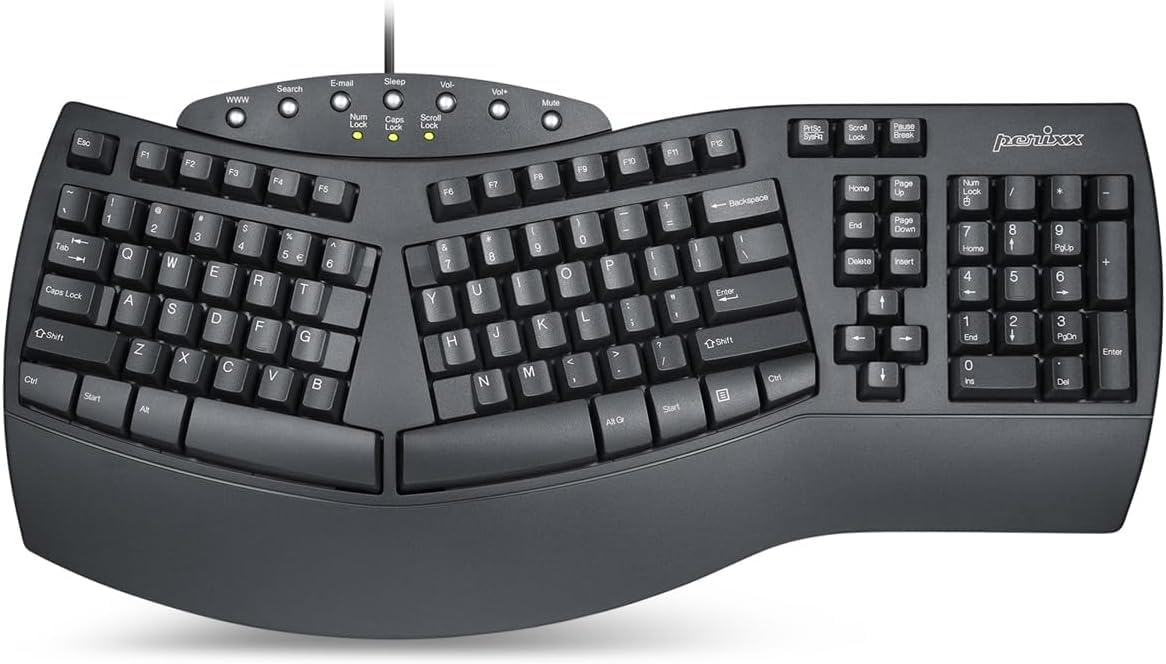
The PERIBOARD-512B is the wired split we point to when someone wants a traditional keyboard feel without the wrist bend. The one-piece split pulls the key zones apart without two separate halves, so it stays put on a desk. The long-travel keys have a tactile, audible click that gives your fingers more feedback than the flat scissor keyboards here.

The wrist rest is integrated and padded, though not as plush as the K860. What we liked most is the combination of a natural hand angle and a key feel that does not punish fast typing. The stepped rows and curved keycaps fit fingertips, and the board is heavy enough not to slide during an angry email.

It is a fixed-desk keyboard in the best sense: no battery, no pairing, no software. The build feels solid for the money, and the layout is familiar enough that most touch typists can settle in without relearning the alphabet. It costs less than the premium picks and more than the budget ones, which feels right for the build.

Pros

  • True one-piece split for natural hand position
  • Long-travel tactile keys with clear feedback
  • Integrated padded wrist rest
  • Wired USB setup needs no charging

Cons

  • Wired USB only, so it ties you to one desk
  • Audible key clicks carry in a quiet office
Our verdict

We recommend the PERIBOARD-512B if you want a true split and a padded rest at a midrange price, and you do not mind a cable.

Check Latest Price
3

Best Compact

Logitech Wave Keys

85 /100
Trail Score Excellent

Key details

Layout
Wave-shaped compact
Connection
Bluetooth and Logi Bolt
Dimensions
14.8 x 8.62 x 1.18 in
Wrist Support
Memory-foam palm rest
Check Price on Amazon

The Wave Keys is the compact ergonomic keyboard we reach for when the desk has to share space with a mouse, a notebook, and a coffee cup. Its wave-shaped key rows lift the outer edges gradually rather than splitting the board in two, so your hands sit at a gentler angle. The body is shorter than the full-size ergonomic boards here, but the number pad stays.

The memory-foam palm rest is the same idea as the K860's, just smaller and lower. The keys are quiet and light, which makes it easy to type through a call without clacking. Bluetooth and Logi Bolt let you switch among three devices, and the Logi Options+ app handles shortcuts if you want them.

We recommend it for smaller desks and lighter typing days, not for maximum wrist separation. If your pain comes from twisting your forearms outward, the true splits here are the better tool. The compact body also puts the arrow keys close together, so give yourself a day to adjust.

Pros

  • Compact wave shape saves desk space
  • Quiet, light key feel for shared rooms
  • Memory-foam palm rest
  • Switches among three devices

Cons

  • Bluetooth pairing can be inconsistent
Our verdict

We recommend the Wave Keys for a compact, quiet desk where you want ergonomic shaping and a palm rest without losing the number pad.

Check Latest Price
4

Best Value Split

Arteck HW315

86 /100
Trail Score Excellent

Key details

Layout
Split key layout
Battery
Up to 6 months
Connection
2.4GHz USB wireless
Wrist Support
Cushioned wrist rest
Check Price on Amazon

The Arteck HW315 is what we point to when the top pick's price is too much but the wrist pain is real. It uses a split key layout and a cushioned wrist rest, so the basic posture fix is there, even if the split is less pronounced than on the K860 or Perixx. The scissor keys are light and quiet, and the low-profile body keeps your hands close to the desk.

We recommend it as the best-value split for a first ergonomic keyboard. The 2.4GHz receiver is plug-and-play, and the rechargeable battery is rated for six months at two hours of typing a day, which makes it easy to forget about charging. The soft wrist rest is the detail we appreciated most during long sessions; it takes the pressure off the heel of the hand without feeling mushy.

The fixed wrist rest is the other compromise: it is comfortable, but you cannot swap it out for a different height. For a single desk and a single computer, the simple setup is easy to live with. If you regularly move between a laptop and a tablet, the Bluetooth splits here are the better fit.

Pros

  • Split layout at a value price
  • Soft cushioned wrist rest
  • Six-month battery rating
  • Plug-and-play 2.4GHz receiver

Cons

  • 2.4GHz only, with no Bluetooth
Our verdict

We recommend the Arteck HW315 as the best-value split for a single desk, with a cushioned rest and a battery that keeps up.

Check Latest Price
5

Best Budget Multi-Device

TECKNET TK-KB030

84 /100
Trail Score Excellent

Key details

Tilt
0, 1.2, 3, 6.2 degrees
Layout
Split curved layout
Connection
Bluetooth 5.0 and 2.4GHz
Wrist Support
Dual-density memory foam
Check Price on Amazon

The four-stage tilt is the detail that makes the TECKNET more adjustable than most budget ergonomic keyboards. The rear feet set the board at 0, 1.2, 3, or 6.2 degrees, so you can dial the front edge up or down instead of accepting one fixed slope. That matters if you move between sitting and standing during the day.

The split layout and curved key rows are gentler than a true two-piece board. The dual-density memory-foam rest gives the palm a soft landing, and the low-profile keys are quiet enough for a shared room. The board feels lighter than the premium picks, but it stays put on a desk mat.

Bluetooth 5.0 remembers up to three devices, and the 2.4GHz dongle covers a desktop without Bluetooth. The 500mAh battery charges in about four hours, which is convenient if you move between a laptop and a monitor. The pairing memory is the feature we kept coming back to: it makes the keyboard feel more flexible than its price suggests.

We recommend it for a budget desk that switches devices, especially if you like a light, quiet touch. If you want a deeper mechanical feel, the true splits here are the better fit. The split is less pronounced than the K860's, so this is not the pick for maximum hand separation.

Pros

  • Four-stage tilt for sitting or standing
  • Bluetooth and 2.4GHz for device switching
  • Dual-density memory-foam rest
  • Rechargeable battery with fast charging

Cons

  • Less hand separation than a full split
Our verdict

We recommend the TECKNET for a budget desk that switches between laptop and desktop, with a cushioned rest and four tilt settings.

Check Latest Price
6

Best with Phone Holder

EAYBLLY QA812

84 /100
Trail Score Excellent

Key details

Layout
Full-size wave
Connection
2.4GHz with USB-C adapter
Device Holder
7.28-inch phone slot
Wrist Support
3-layer memory foam
Check Price on Amazon

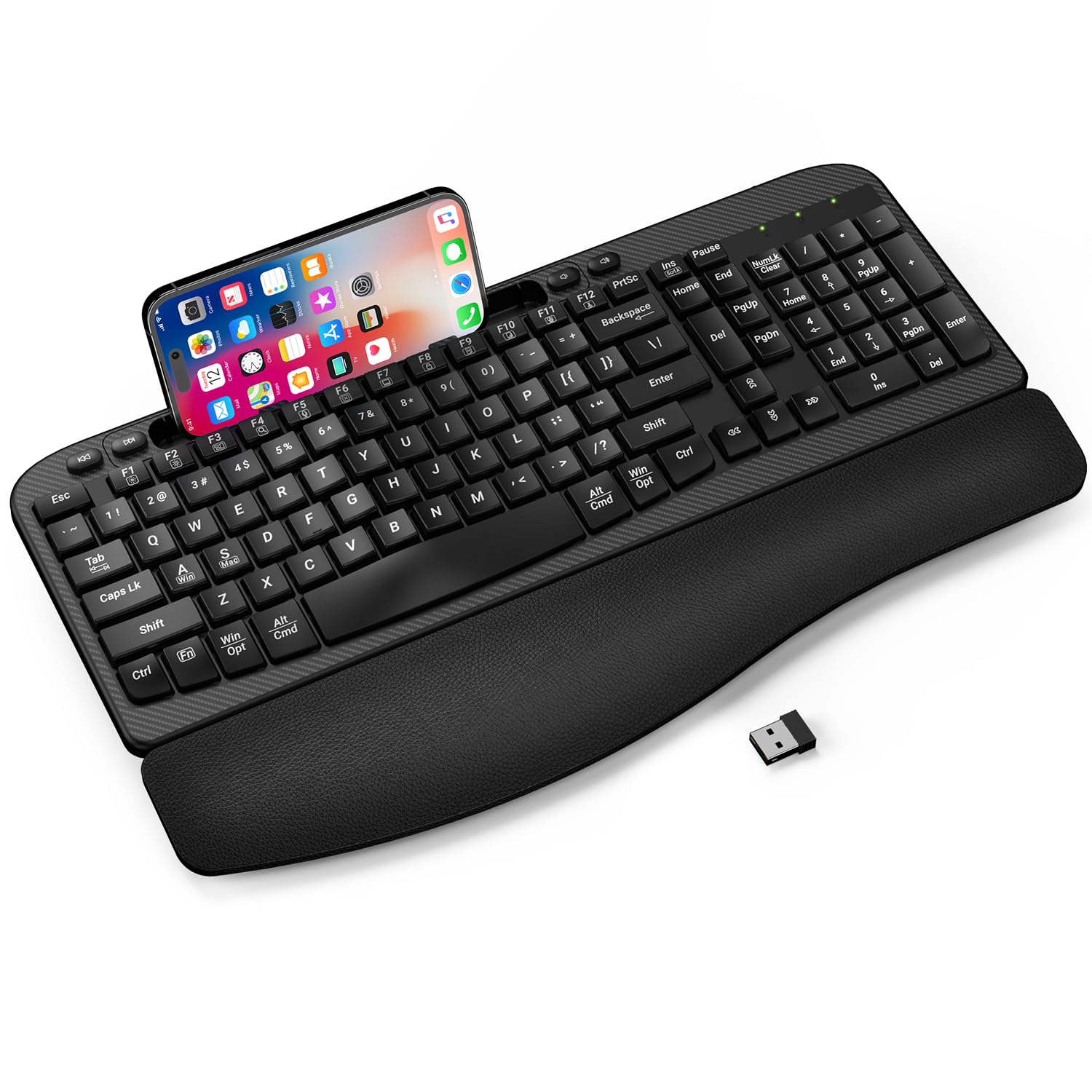
The built-in phone slot is the reason the EAYBLLY earns a place here. The 7.28-inch channel holds a phone upright or sideways at the back of the keyboard, so a call, timer, or recipe stays in view without a separate stand. It is a small convenience, but it is one you notice every time your phone would otherwise be lying flat on the desk.

The rest of the package is a full-size wave keyboard with a three-layer memory-foam wrist rest and a USB-C adapter for newer laptops. The wave is gentle, and the keys are quiet and soft rather than clicky. The full number pad and shortcut keys make it feel like a traditional office keyboard with a more natural shape.

We recommend it for a desk where the phone is part of the work, not for someone who needs a true split. The 2.4GHz connection is plug-and-play, but it is not Bluetooth, so switching to a tablet means moving the dongle. If you want maximum wrist separation, the K860 or Perixx is the better tool.

Pros

  • Built-in phone slot keeps a screen in view
  • Three-layer memory-foam wrist rest
  • Full-size wave layout with number pad
  • USB-C adapter included

Cons

  • 2.4GHz only, with no Bluetooth
Our verdict

We recommend the EAYBLLY for a full-size desk with a phone in view, thanks to its soft rest, wave keys, and built-in slot.

Check Latest Price
7

Best Budget Compact

Nulea Wave Keys

86 /100
Trail Score Excellent

Key details

Tilt
Adjustable rear feet
Layout
Compact wave
Connection
2.4GHz wireless
Wrist Support
Cushioned palm rest
Check Price on Amazon

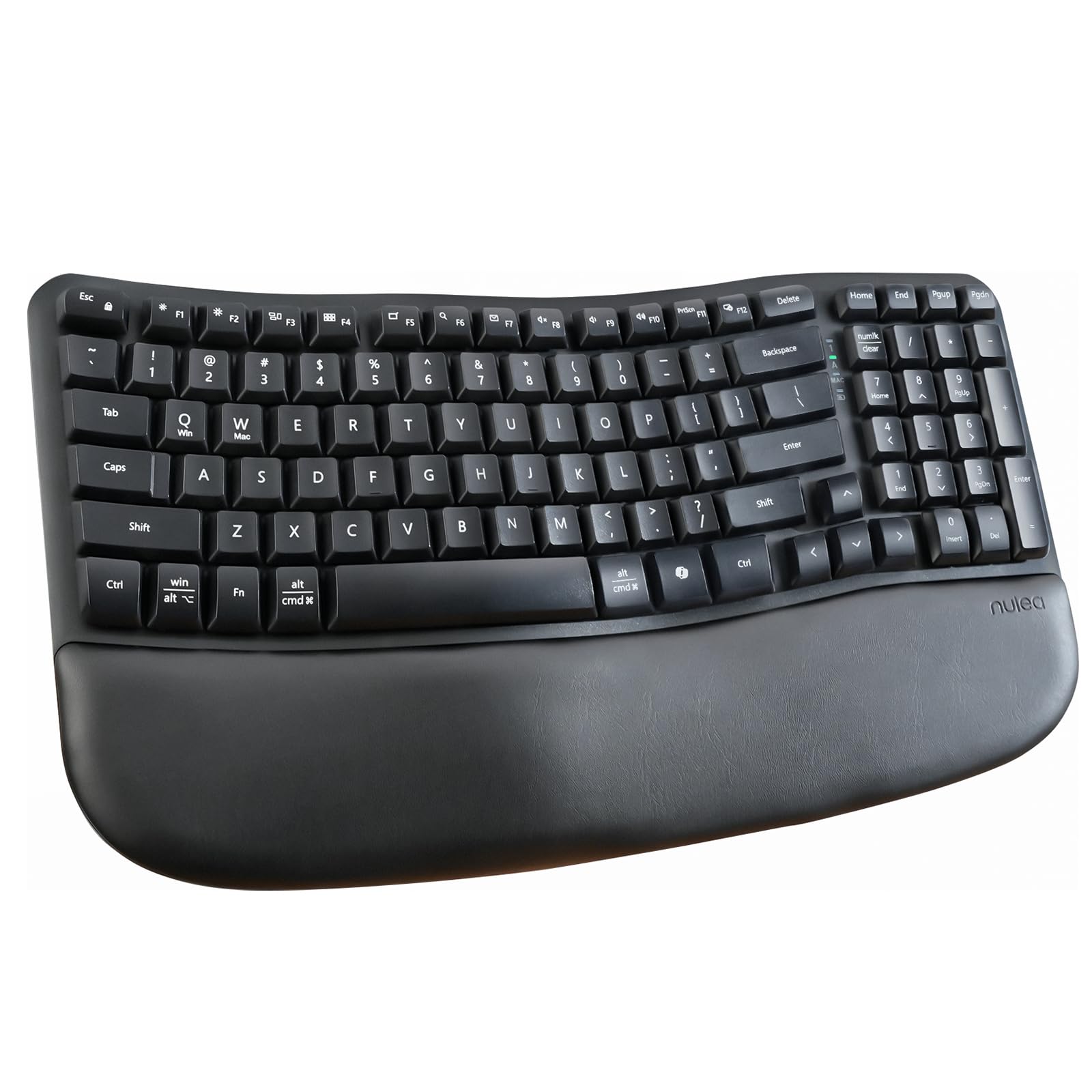
The Nulea Wave Keys is the quiet, small-desk keyboard we reach for when the Logitech Wave is more than the budget allows. It has a wave-shaped key layout, a cushioned palm rest, and a narrower body than the full-size ergonomic boards here. The shape is gentle rather than dramatic, which makes it an easy first step away from a flat keyboard.

The keys are soft and quiet, with a light touch that does not demand much finger force. We liked how little desk noise it adds during a call, and the rear feet let you set a slight slope. The palm rest is soft enough for a full workday, though it is not as deep as the K860's.

The compact body puts the arrow keys close together; touch typists may need a few days to stop reaching for the wrong one. We also wish the palm rest were a little deeper, but at this size the trade-off is understandable. For a single desk and a single computer, the simple setup is easy to live with.

Pros

  • Quiet, light key feel
  • Compact wave body saves desk space
  • Cushioned palm rest at a low price
  • Adjustable rear feet

Cons

  • 2.4GHz only, with no Bluetooth
Our verdict

We recommend the Nulea Wave Keys for a quiet, compact desk on a tight budget, as long as one computer is all you need.

Check Latest Price
8

Trying a Split

Nulea Split RT07B

80 /100
Trail Score Excellent

Key details

Layout
Split key layout
Battery
200-hour battery life
Connection
Bluetooth and 2.4GHz
Wrist Support
Soft palm rest
Check Price on Amazon

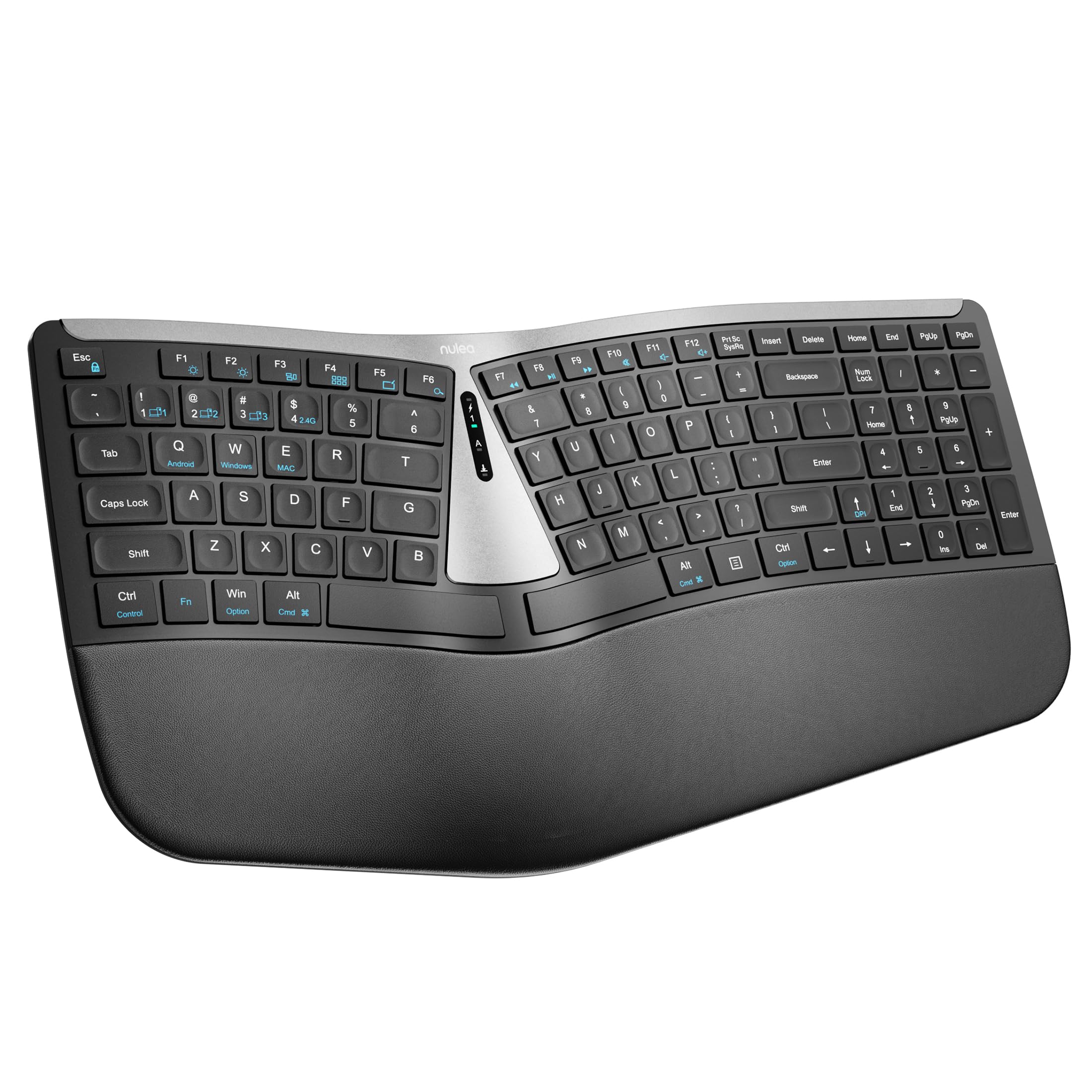
The Nulea split is the least expensive way into a true split layout here, and it still includes a soft palm rest and dual wireless. The split separates the key zones enough to reduce the forearm twist that a standard board encourages. For anyone who has been ergo-curious but not ready to spend, it is the obvious experiment.

The scissor keys are light and quiet, with a short travel that suits fast, low-effort typing. The rechargeable battery is rated for 200 hours, and the board switches between Bluetooth and a 2.4GHz dongle. The layout is familiar enough that the split feels like the only new variable.

The build is where the savings show: the plastic feels lighter than the premium picks, and the palm rest is soft but not as deep as the K860's. The keys are also closer to a laptop than to a mechanical board, which some typists will love and others will not.

We recommend it as a trial run for a split keyboard, not as the last keyboard you buy. If you are unsure whether a split will help your wrists, this is a low-risk way to find out. If you already know you want a split for eight-hour days, spend more for the Perixx or K860.

Pros

  • True split layout at the lowest price here
  • Soft palm rest and quiet scissor keys
  • Bluetooth and 2.4GHz dual wireless
  • 200-hour rechargeable battery

Cons

  • Battery and Bluetooth stability are the weak points
Our verdict

We recommend the Nulea split as a low-cost way to try a true split layout before committing to a premium keyboard.

Check Latest Price

What Eight Months of Typing on 11 Ergonomic Keyboards Taught Us

We started with a list of roughly 40 keyboards and cut it down by reading spec sheets: how far each half could split and tent, whether the layout was columnar or staggered, what switches sat under the keys, and how many devices each one could pair with. Anything that adjusted in only one direction got dropped, and we kept an eye on price so the final group ran from budget-friendly to genuinely expensive. Eleven made the cut.

Each board went to a tester who used it as their only keyboard for at least three weeks — real work, not test documents. We typed the same 500-word passage on day one and again on day ten to see how fast speed and accuracy came back. We photographed where wrists actually landed, noted whether the palm rests left forearms hovering in the air, and asked testers who already had wrist pain to rate how they felt at 4 p.m. versus on their old board. Noise got checked mid-video-call, with a phone propped on the desk to catch whether the clatter carried.

Connectivity we tested the messy way: pairing each board to a laptop, a desktop, and a phone, then switching between them mid-sentence to see what dropped. Over eight months we watched for keycaps going shiny or wobbly, cables fraying, and batteries that stopped holding a charge. We also weighed value honestly — a few boards charged a premium for functions we abandoned after the first week, and a couple of cheaper ones kept pace just fine.

How to Choose an Ergonomic Keyboard for Wrist Pain

Start With the Layout

A true split separates the key zones so your hands sit closer to shoulder width; a wave keyboard keeps the board in one piece but angles the rows gradually. If your pain runs along the thumb side of the wrist or you feel your forearms twisting inward, prioritize a split like the K860 or Perixx. If you want an easier transition and a smaller footprint, the Logitech Wave Keys or Nulea Wave is the gentler choice. A split is not automatically better for every hand, but it is the more direct correction.

Look for Palm Support, Not Just a Cushion

The wrist rest should keep the heel of your hand level with the keys, not prop it up into a sharper bend. Memory foam is plusher, but a firm rest that holds its shape can be more useful if you press down while typing. Adjustable tilt matters too: a negative slope, where the front edge drops, can take pressure off the wrists. The K860's three palm-lift positions are the most flexible here; the TECKNET and EAYBLLY also give you tilt choices, while the Perixx and Arteck rely on a fixed rest.

Match Key Feel to Your Typing Day

Scissor keys are shallow, quiet, and light; membrane and tactile keys have more travel and feedback. If your fingers fatigue from pressing hard, a light scissor board like the Logitech Wave Keys or Arteck HW315 is easier to live with. If you like a traditional keyboard feel and do a lot of fast typing, the Perixx's longer travel is more satisfying. Noise is part of this choice: the Perixx is one of the louder boards here, while the Nulea Wave and Logitech Wave are quiet enough for shared calls.

Decide How You Connect

A wired keyboard is the simplest choice for a fixed desk: no charging, no pairing, no dropouts. A 2.4GHz dongle is the next most reliable step and usually plugs in without software. Bluetooth is the one to choose if you switch between a laptop, desktop, and tablet, but it is also the connection most likely to need a re-pair. The K860 and Logitech Wave Keys handle multi-device switching; the Arteck HW315 and EAYBLLY are dongle-only. Check which adapter your laptop has before you buy.

Measure the Desk, Not Just the Keyboard

Full-size ergonomic boards are wide, and a split or wave shape takes getting used to. Measure the width you have left for a mouse before you choose; the Perixx is a broad board, while the Logitech Wave Keys and Nulea Wave are easier to pair with a mouse on a small desk. If you use the number pad all day, keep it; if not, a compact board frees up space. A compact board buys desk room, but check the width before you commit.

Frequently Asked Questions

Final Verdict

For most people with wrist pain, the Logitech Ergo K860 is the default because it combines a true split, the plushest palm support here, and adjustable palm lift in one wireless keyboard. If you want a cable and a more traditional key feel, the Perixx PERIBOARD-512B is the better buy; if desk space is tight, the Logitech Wave Keys is the compact choice.

The rest of the group covers budget splits, phone-holder desks, and quiet compact boards without asking you to give up the ergonomic basics. Choose the one that matches your desk and connection first; the layout and palm support will do more for your wrists than the switch type.